Applications Monitoring Process
Thanks to Glances and its AMP module, you can add specific monitoring to running processes. AMPs are defined in the Glances configuration file.
You can disable AMP using the --disable-plugin amps option or pressing the
A key.
Simple AMP
For example, a simple AMP that monitor the CPU/MEM of all Python processes can be defined as follows:
[amp_python]
enable=true
regex=.*python.*
refresh=3
Every 3 seconds (refresh) and if the enable key is true, Glances
will filter the running processes list thanks to the .*python.*
regular expression (regex).
The default behavior for an AMP is to display the number of matching processes, CPU and MEM:

You can also define the minimum (countmin) and/or maximum
(countmax) process number. For example:
[amp_python]
enable=true
regex=.*python.*
refresh=3
countmin=1
countmax=2
With this configuration, if the number of running Python scripts is higher than 2, then the AMP is displayed with a purple color (red if less than countmin):

If the regex option is not defined, the AMP will be executed every refresh time and the process count will not be displayed (countmin and countmax will be ignored).
For example:
[amp_conntrack]
enable=false
refresh=30
one_line=false
command=sysctl net.netfilter.nf_conntrack_count && sysctl net.netfilter.nf_conntrack_max
Note: for multiple command, please use the ‘&&’’ separator.
For security reason, pipe is not directly allowed in a AMP command but you create a shell script with your command:
$ cat /usr/local/bin/mycommand.sh
#!/bin/sh
ps -aux | wc -l
and use it in the amps:
[amp_amptest]
enable=true
regex=.*
refresh=15
one_line=false
command=/usr/local/bin/mycommand.sh
User defined AMP
If you need to execute a specific command line, you can use the
command option. For example, if you want to display the Dropbox
process status, you can define the following section in the Glances
configuration file:
[amp_dropbox]
# Use the default AMP (no dedicated AMP Python script)
enable=true
regex=.*dropbox.*
refresh=3
one_line=false
command=dropbox status
countmin=1
The dropbox status command line will be executed and displayed in
the Glances UI:

You can force Glances to display the result in one line setting
one_line to true.
Security considerations
AMP command and service_cmd values are read verbatim from the
configuration file and executed. The execution helper interprets three
shell-like operators:
&&to chain commands|to pipe one command output into the next one>to redirect the output to a file
These operators are convenient but mean that anyone able to edit the Glances configuration file can run arbitrary commands or write to arbitrary files through an AMP section.
For system services or any deployment where the configuration file is not
fully trusted, start Glances with the --disable-config-exec option. In
addition to disabling backtick command execution in configuration values,
this option makes AMP commands run as a single process: &&, | and
> are then treated as literal arguments and are no longer interpreted, so
an AMP command can neither chain commands, pipe, nor write to an arbitrary
file.
$ glances --disable-config-exec
Note: with --disable-config-exec set, AMP commands that rely on these
operators stop working. Move such logic into a dedicated shell script and
point the command option to that script instead.
Embedded AMP
Glances provides some specific AMP scripts (replacing the command
line). You can write your own AMP script to fill your needs. AMP scripts
are located in the amps folder and should be named glances_*.py.
An AMP script define an Amp class (GlancesAmp) with a mandatory
update method. The update method call the set_result method to set
the AMP return string. The return string is a string with one or more
line (n between lines). To enable it, the configuration file section
should be named [amp_*].
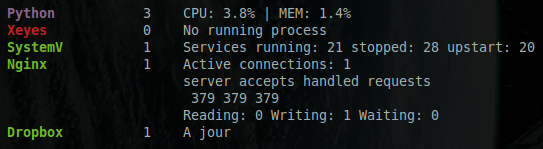
For example, if you want to enable the Nginx AMP, the following definition should do the job (Nginx AMP is provided by the Glances team as an example):
[amp_nginx]
enable=true
regex=\/usr\/sbin\/nginx
refresh=60
one_line=false
status_url=http://localhost/nginx_status
Here’s the result:
In client/server mode, the AMP list is defined on the server side.